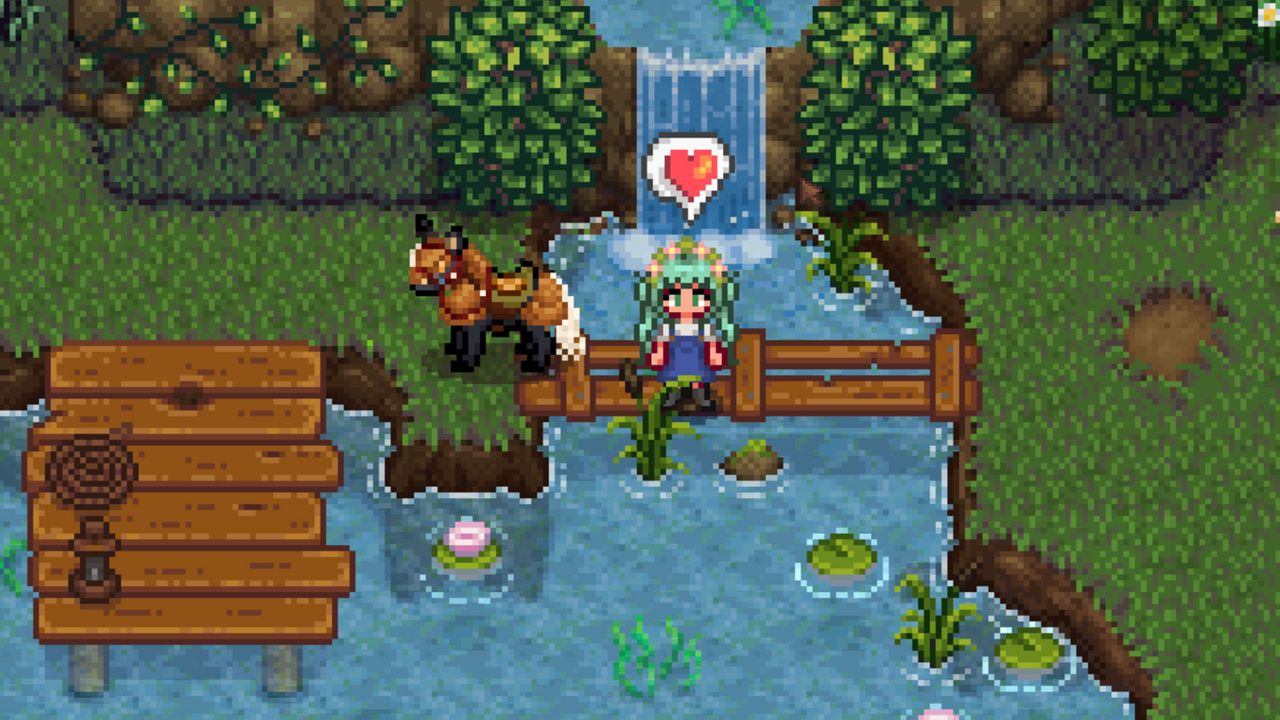
There’s plenty to do in the vanilla valley, but the sky is the limit once you learn how to install Stardew Valley mods. With so much community support, it’s an easy game for first-time modders to dive into, but modding can still be an intimidating task.
The modding scene for ConcernedApe’s farming sim is easily one of my favorites, and with a good primer on the basics maybe it can be one of yours, too. To help you get there, I’ll walk you through how to install Stardew Valley mods with a breakdown of SMAPI (a required framework for loading mods), popular download resources, and getting started with a mod manager.
How to install Stardew Valley mods
This guide is organized into three parts. We’ll start by downloading basic Stardew Valley mod tools, then go on to installing SMAPI and the Stardrop mod manager. Players familiar with the first steps can use the navigation on the left to skip ahead, or keep on scrollin’ to start from square one.
Download basics like SMAPI and Stardrop first
You’ll need a few basic tools to install Stardew Valley mods and get them running smoothly. I strongly recommend downloading Stardrop and Content Patcher, but the Stardew Modding API (SMAPI) is the only absolute must.
To follow along with the guide, download SMAPI, Stardrop, and Content Patcher. Extract all three to a central folder for easy access.
|
Tool |
Utility |
Required |
Description |
|---|---|---|---|
|
Mod loader |
✅ |
Popular framework for launching Stardew Valley with mods |
|
|
Mod manager |
⚠️ |
Keeps files organized with options for updates or multiple profiles to enable or disable certain mods |
|
|
Mod tool |
⚠️ |
Dynamic mod loader, allows mods to load without replacing game files. Technically not required, but strongly recommended |
|
|
Mod tool |
❌ |
Similar purpose to Content Patcher, but less common |
Where to find Stardew Valley mods
You can download individual mods from popular hubs listed below, but get the basics above up and running before amassing any unwieldy collections.
Where to find the Stardew Valley mod folder
Your Stardew Valley mod folder should be inside of your game directory. You’ll want to have the exact folder directory handy to make sure SMAPI and Stardrop sort mods into the correct directory.
|
OS / Store |
Directory |
|---|---|
|
Windows (Steam) |
C:Program Files (x86)SteamsteamappscommonStardew ValleyMods |
|
Windows (GOG) |
C:Program Files (x86)GOG GalaxyGamesStardew ValleyMods |
|
Linux (Steam) |
~/.local/share/Steam/steamapps/common/Stardew Valley/Mods |
|
Linux (GOG) |
~/GOGGames/StardewValley/game/Mods |
After launching Stardew Valley at least once and installing SMAPI, you can install mods by placing them directly into the folder. All mods must be inside of their own folder inside of the mods folder, so your path looks like this: /Stardew Valley/Mods/Mod Name
You don’t need a mod manager, but I recommend using Stardrop instead of unzipping and organizing them in the folder yourself. Stardrop keeps downloads tidy and easy to troubleshoot.
How to install SMAPI (Stardew modding API)
SMAPI is the mod loading framework making all this possible—your most important piece of the process. After downloading the loader and launching Stardew Valley vanilla at least once, extract SMAPI’s contents into any directory and double click the correct bat file to install.
This process should leave you with a new mod folder and the StardewModdingAPI.exe inside the game’s main directory.
Here’s a full step-by-step on how to install SMAPI for Windows or Linux users:
Download and extract SMAPI
- If modding a fresh install, launch Stardew Valley unmodded at least once
- Download and extract SMAPI; the location doesn’t matter
- Run the Install on Windows.bat file (or Linux)
- Follow the console instructions to install SMAPI in the game directory
- Next steps depend on your storefront, either Steam or GOG
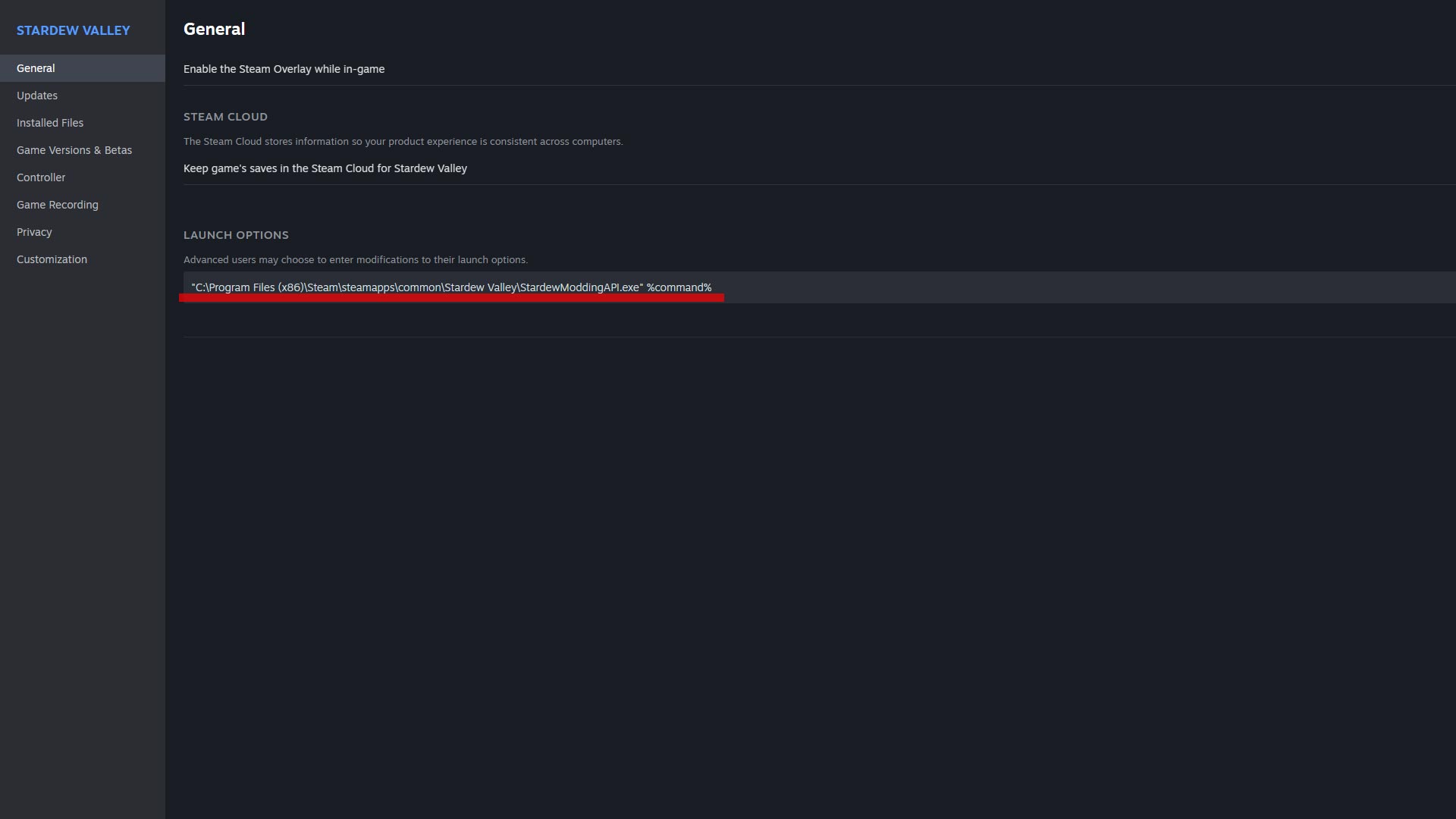
Steam users
- Right click Stardew Valley from the Steam library
- Under General, look for the Launch Options text box and enter:
|
“C:Program Files (x86)SteamsteamappscommonStardew ValleyStardewModdingAPI.exe” %command% |
GOG users
- Right click Stardew Valley from the GOG library
- Select Manage Installation, then Configure
- On the Features tab, enable Custom Executables/Arguments
- Click Add Another Executable
- Select StardewModdingAPI.exe from the game directory
- Check the Default Executable option under the modding API
How to install Stardrop mod manager
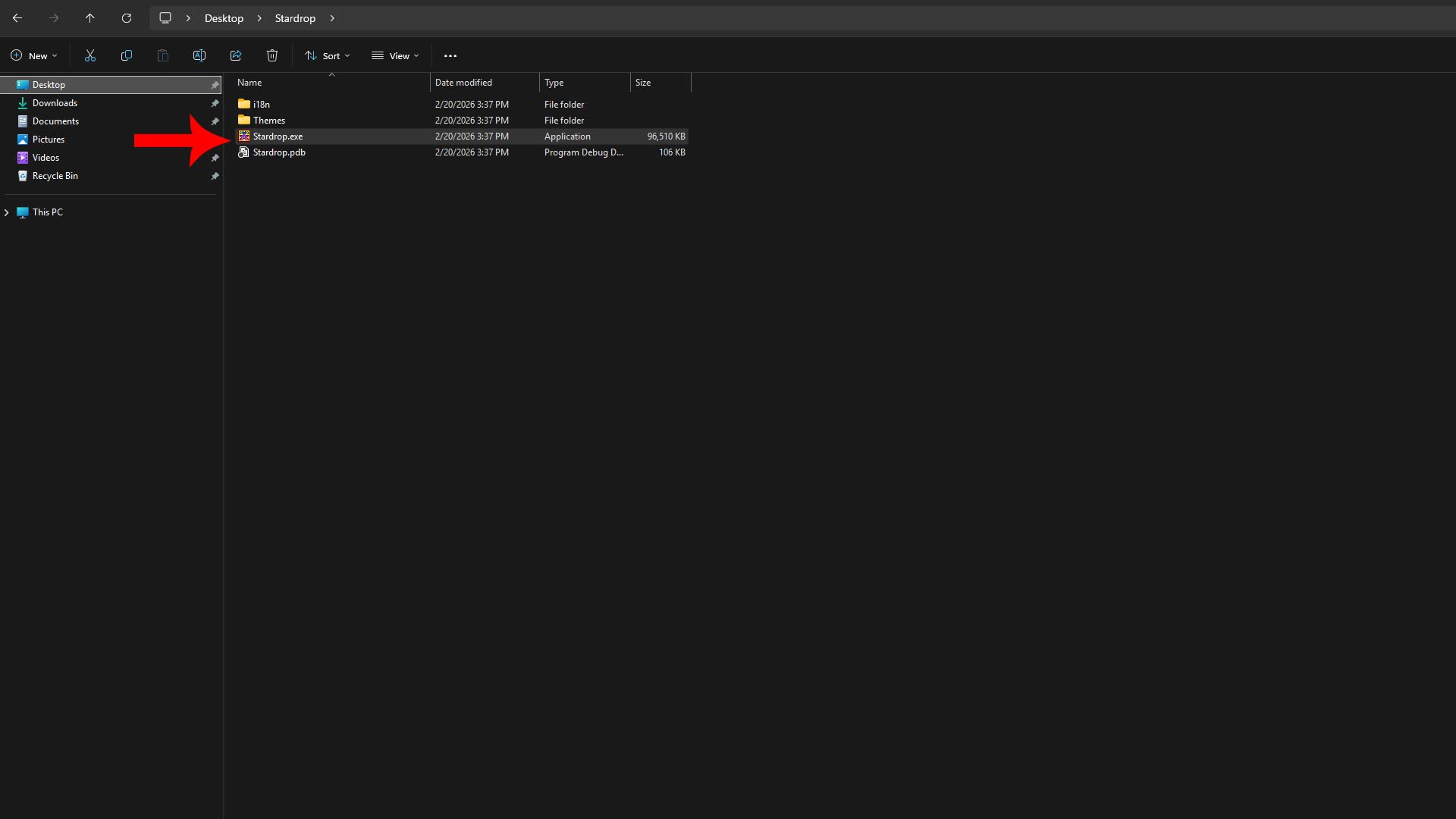
Extract the Stardrop folder anywhere on your desktop—I use my Documents folder for safekeeping—and double click Stardrop.exe to launch the mod manager for the first time. This is the tool that will install, remove, enable, or disable mods for you. It makes the process a million times easier.
Opening Stardrop for the first time
When loading Stardrop for the first time, the exe asks if you would like to “associate the NXM protocol with Stardrop” to automatically install downloads from Nexus Mods. I always do this, but it’s optional.
- Yes – Automatically download and install a mod after clicking a Nexus link
- No – Manually add files into Stardrop yourself
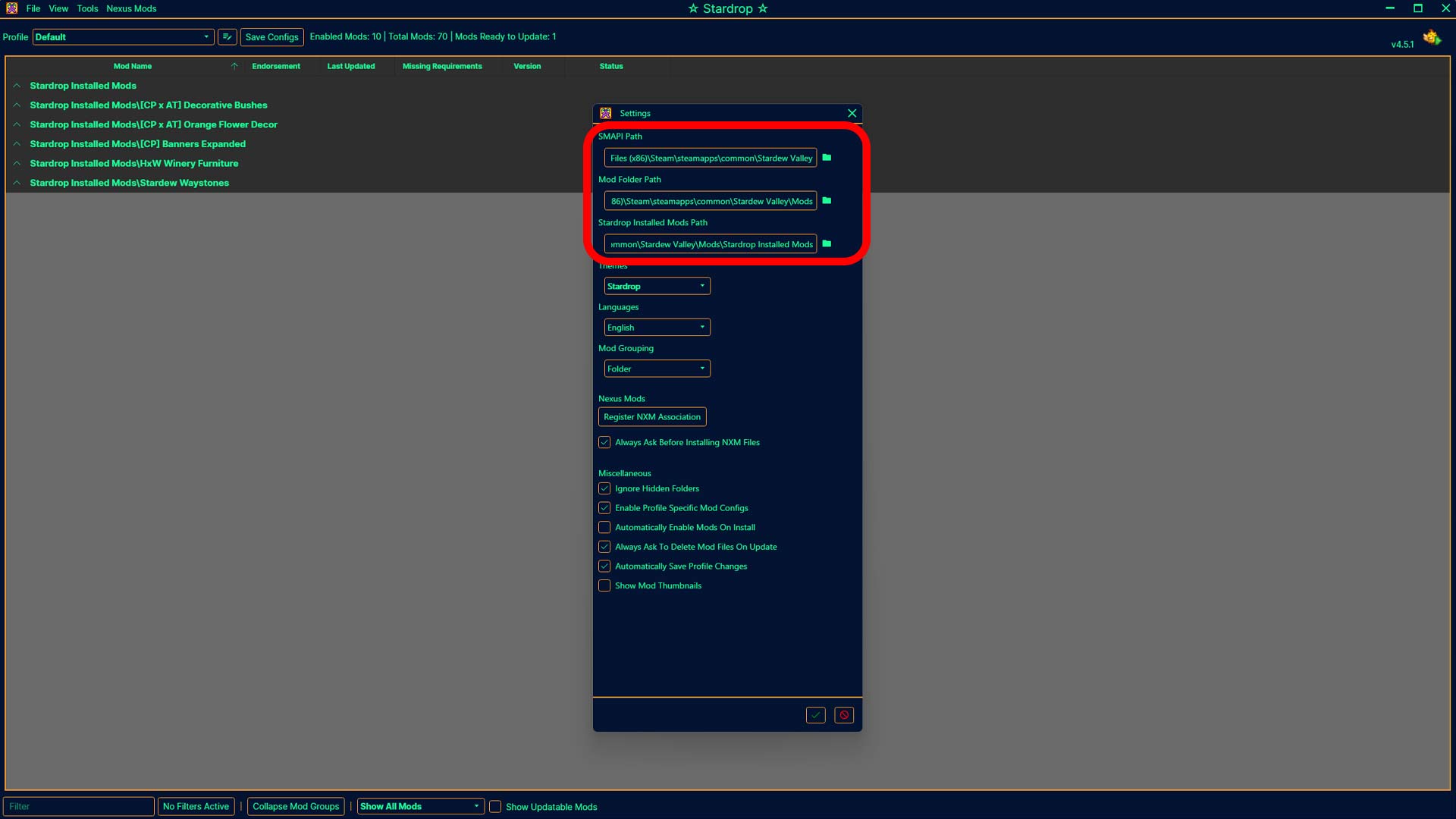
Configuring Stardrop directories
Navigate to View > Settings and check all three file paths for SMAPI, the Stardew Valley Mod folder, and a new Stardrop Installed Mods folder. The new addition is where Stardrop will dump your mods.
|
Path |
Example Folder Path Setup |
|---|---|
|
SMAPI |
C:Program Files (x86)SteamsteamappscommonStardew Valley |
|
Mod Folder |
C:Program Files (x86)SteamsteamappscommonStardew ValleyMods |
|
Stardrop Installed Mods |
C:Program Files (x86)SteamsteamappscommonStardew ValleyModsStardrop Installed Mods |
Installing mods through Stardrop
If you don’t use the Nexus Mods protocol, you can drag and drop zipped mods directly into Stardrop’s interface or click File > Add Mods and select the compressed file. Stardrop will unpack it and handle the rest.
With your mods loaded in Stardrop, click the box beside your new additions to enable them. If you want to disable a mod, uncheck the same box. Click Save Configs when you make any changes and restart the game.
How to install Content Patcher and Alternative Textures
You can automatically install Content Patcher through Stardrop, or visit Nexus Mods for a separate download. Content Patcher doesn’t do anything as a standalone mod, but tons of modders use it to load custom assets without altering the base game files.
Alternative Textures is similar to Content Patcher and they’re compatible with each other, but typically works through in-game items like the Paint Bucket or Scissors while providing multiple options for customization. That’s not an option with Content Patcher.
|
Feature |
Content Patcher |
Alternative Textures |
|---|---|---|
|
Replaces original game file |
❌ |
❌ |
|
Limit per asset ID |
Only one can be active at a time |
Unlimited |
|
Enabled via in-game item |
❌ |
✅ |
Should I use Content Patcher, Alternative Textures, or both?
You can use Content Patcher and Alternative Texture mods together, but I would prioritize installing Content Patcher over everything else since so many modders use it.
When downloading mods, look for abbreviations like (CP) for Content Patcher or (AT) for Alternative Textures and select the correct version(s) depending on how you want to use the retexture.
CP mods are typically good for static elements you don’t plan on changing a lot, but keep in mind you can only have one CP mod at a time for the same asset. AT mods can overwrite CP changes or each other using items and other in-game menus on the fly, so you can have multiple AT files.

Stardew Valley mods: Custom farming
Stardew Valley cheats: Farm faster
Stardew Valley multiplayer: Co-op farming
Games like Stardew Valley: More life sims
Best indie games: Independent excellence
feedzy_import_tag feedzy_import_tag
About the Author