TL;DR
- Steam is currently online and operating normally across most regions.
- Valve runs routine Steam maintenance every Tuesday, usually between 1:00 and 3:00 PM PT, which can cause brief and temporary server downtime.
When Steam is down, it feels like the entire gaming world is on pause. While sudden outages are usually temporary, they affect purchases, matchmaking, trading, downloads, and updates, which can completely ruin your plans.
This naturally leads players to ask, “When will the Steam servers come back online?” In case there’s any doubt, you can find the latest status updates and tips on what to do when Steam servers are unavailable in this guide.
Are Steam servers down right now?
No, the Steam server status is currently stable across most global regions (last checked: 12:07 UTC on February 6, 2026)
Most players are reporting a smooth experience with no major disruptions today. That said, we did notice some brief hiccups during the routine Tuesday maintenance period, but the network is currently working for most players.
If you’re experiencing Steam connectivity issues, it might be a local or regional issue.
How long do Steam server outages typically last?
There’s no fixed timeframe for Steam outages, as they usually depend on the cause. However, most unexpected outages are short and are often resolved within minutes once Valve identifies the issue.
Routine Steam maintenance typically lasts 10–30 minutes and is designed to keep services running smoothly. In rare cases, especially during larger updates or technical problems, it can take a few hours for the Steam servers to come back online.
What to do when Steam servers are unavailable?
If Steam is down, you can still play many of your games in Offline Mode. As long as you are already logged in, you can still play single-player titles without a problem, provided that they don’t require an internet connection.
How to check the Steam server status in real time
When Steam is down, it’s only natural that you’d want to know what the reason is and—more importantly—how long you’ll have to wait to get back into your game.
Here are some foolproof ways to check if the Steam servers are down:
Official Steam channels
For the most reliable updates, Valve’s official Steam Support page and verified Steam Twitter (X) page are the first places to check.
These sources typically report major global outages or extended service disruptions. Keep in mind that routine maintenance windows, which often last just a few minutes, aren’t usually announced because they’re part of normal platform operations rather than unexpected downtime.
Third-party Steam status trackers
For the quickest updates, players often use a Steam down detector.
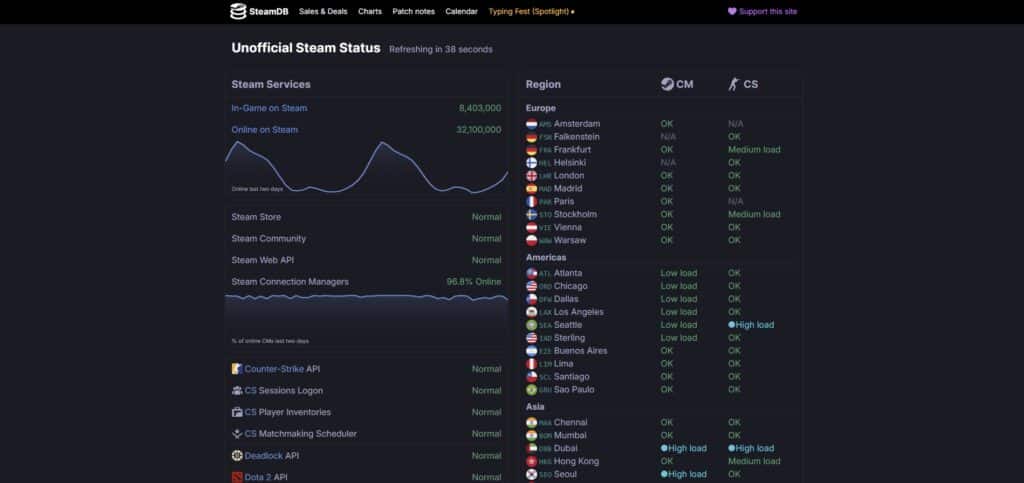
Monitoring tools like Steam Down Detector or SteamDB are great because they provide real-time server status updates. This is achieved by aggregating live user reports and activity, making it easy to spot sudden drops in traffic.
For example, if thousands of players experience disruptions at the same time, the trend becomes immediately noticeable in their Steam charts, helping you determine if an issue is widespread or localized.
Why are Steam servers down? Common causes explained
Understanding why Steam servers are down helps take the stress out of a frustrating situation. Most of the time, it boils down to a few common reasons:
- Server overload: During a major Steam sale or a massive game launch, millions of people can rush in at once.
- Technical glitches: Sometimes, a simple software bug can cause problems. Even a small error can trigger a broader Steam outage until a patch is deployed.
- Steam maintenance: Routine updates are necessary to keep the platform secure. These planned breaks are the most common reasons you might run into “Steam server down” messages.
Why does Steam go down on Tuesdays?
Steam goes down on Tuesdays because Valve runs routine platform maintenance during that time, usually between 1:00 and 3:00 PM PT.
These service windows usually last only a few minutes, but they’re the most common reason Steam servers go down.
During this time, shared backend systems can also pause, which is why critical game services, such as the Dota 2 game coordinator, may temporarily go offline. Your friends list, downloads, or store pages might also momentarily stop loading.

How to know if Steam servers are down — or is it just me?
The easiest way to tell if the Steam outage is global or affecting only your device is to check status trackers. You can also check your friends list—if you see friends online but cannot join a game, it might be a global problem.
How to troubleshoot Steam connectivity problems
If you suspect the issue is on your end, start with the basics: restart your Steam client, your PC, and your router. These quick fixes may seem “simple,” but they resolve the majority of common connection and syncing problems.
If that doesn’t work, you can try the following troubleshooting steps:
- Check your internet connection: Slow or failed loads could point to a network issue, not a Steam problem. Test your internet by loading a few websites or running a quick speed test.
- Check your antivirus and firewall: Your security software may be blocking the latest update from installing correctly. Open your antivirus or firewall software and add Steam to your whitelist or exclusions list.
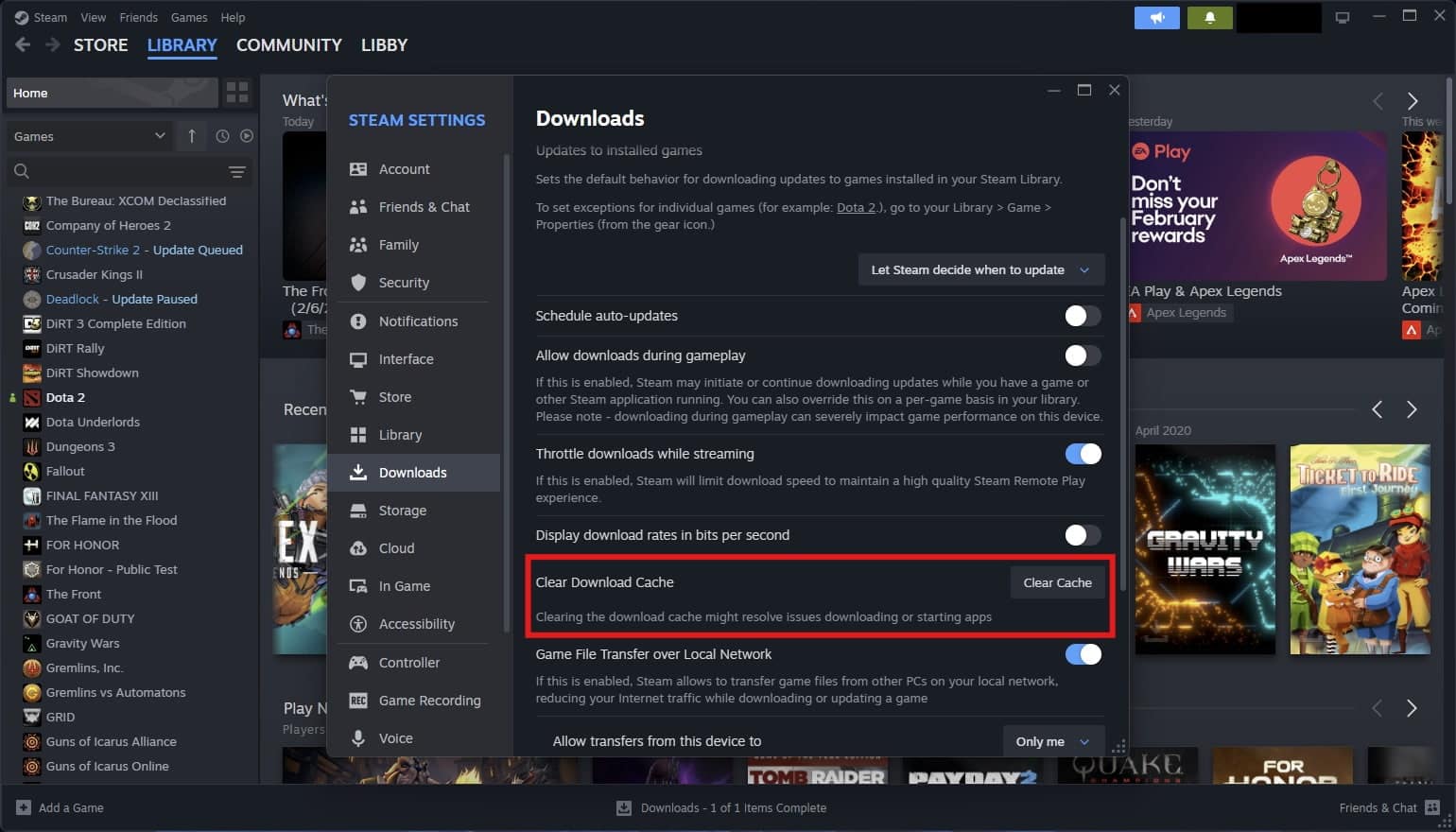
- Clear your cache: Corrupted cache files can prevent the client from launching properly. Go to your Steam Settings > select the “Downloads” tab > look for the “Clear Download Cache” section and then click “Clear Cache.”
- Verify your game files: A failed update could break your client. Go to your Steam Library > right-click on the game > select “Properties” > go to the “Installed Files” menu > click “Verify integrity of game files.”
FAQs
How long will the Steam servers be down for maintenance?
Routine Steam maintenance is usually brief, typically lasting about 20–30 minutes. Larger maintenance windows are rare but can last 1–2 hours during major updates or technical work.
Is Steam down for maintenance every Tuesday?
Yes. Almost every week, Valve uses this window to deploy routine updates, most commonly between 1:00 and 3:00 PM PT.
Why is Steam not working?
If the Steam server status appears normal, the issue is often local, such as firewall or antivirus interference, network instability, corrupted files, temporary sync issues, or faulty network drivers.
Why are Steam servers so slow?
Steam servers are generally fast, but speed can drop during sales or when a major game launches. If your speed is low, try changing your Download Region in the Steam Settings to a less congested server.
REFERENCES
- Steam Support (Steam)
- Steam on X (X)
- Steam outages reported in the last 24 hours (DownDetector)
- Database of everything on Steam (Steam DB)
The post Is Steam down right now? appeared first on Esports Insider.
feedzy_import_tag feedzy_import_tag
About the Author